
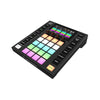
Your Moving Heads Can Do More Than Auto Mode: The Case for the Wolfmix W1 MK3
, by Nadim Thobhani, 5 min reading time
, by Nadim Thobhani, 5 min reading time
A lot of mobile DJs and small venues already own decent lighting: a pair of moving heads, some LED pars, maybe a laser or two. What most of them never get is proper control over it. The fixtures spend their whole working life in a built-in sound-active or auto-run mode, flashing along to whatever is loudest in the room, because the alternative has always meant either an expensive lighting desk or laptop software that adds one more thing to go wrong on the night.
The Wolfmix W1 MK3 exists for exactly that middle ground. It is a standalone DMX controller, so there is no laptop running alongside the DJ software, no extra screen to babysit, and nothing to update five minutes before doors open. Everything that builds and runs the show lives on the unit itself.
Anyone who has tried running lighting through free or budget laptop software will recognise the trade-off. It is capable, but it is also another program competing for processing power and attention on a machine that is usually already busy running the actual DJ set. Buyers moving across to the W1 MK3 from that kind of setup tend to describe the same relief: no second laptop to carry, and no second piece of software that might crash mid-set.
Where the W1 MK3 earns its price is in what happens once the lighting is switched on. Dedicated engines behind the console handle colour, movement and beam effects independently, running at 25 frames per second so that chases and colour changes move smoothly rather than in the jerky steps typical of basic scene-based controllers. Layering these effects on top of each other, rather than picking one static look and leaving it running all night, is what actually separates a programmed show from a fixture left on auto.
Timing is handled from several directions at once. An internal microphone picks up the beat with no wiring at all, a 3.5mm line-in gives a tighter sync when fed from a mixer output, and Ableton Link or OS2L cover anyone already running music from a laptop or DAW who wants lighting locked to tempo changes automatically. A manual BPM tap sits underneath all of that for tracks with no clear beat to read.
Fixture support is where a lot of standalone DMX controllers start to show their limits, and it is worth checking before buying into any unit in our DMX Controllers & Software range. The W1 MK3 ships with thousands of profiles built in and access to over fifteen thousand more through its companion app, alongside a custom fixture builder for anything unusual or multi-effect that is not already listed. That combination matters more to someone without a lighting background than any single spec on the sheet, since it removes the manual DMX charting that puts most people off programming their own fixtures in the first place.
Growth is built in rather than bolted on. Two DMX universes are included, with two more available as an upgrade for anyone running a genuinely large rig, and the WLINK feature pairs two units together for double the physical control and up to eight universes between them. For anyone curious what else sits alongside it, DJKIT's Wolfmix range shows the rest of the line the W1 MK3 is built to work within.
The realistic buyer here is a mobile DJ or small entertainment company that already owns a handful of moving heads, LED bars or scanners and wants an actual show rather than a flashing backdrop, alongside small bars and function venues running their own house lighting without a dedicated engineer on site. Anyone shopping for the fixtures to go with it will find DJKIT's Moving Heads range covers most of what the W1 MK3 is built to drive.
At £719, it sits well below the cost of a full lighting desk while doing considerably more than an entry-level fader controller, and we offer 0% finance through its DJ Finance page for anyone spreading the cost alongside the rest of a rig.
Full technical specifications, box contents and current stock are available on the Wolfmix W1 MK3 product page, including the connection options for anyone slotting it into an existing DMX setup rather than starting from scratch.