
DJing for Dummies: Play & Cue
, by Graig Upton, 3 min reading time
, by Graig Upton, 3 min reading time
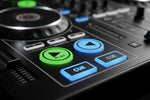
The two buttons you will reach for more than any others on a media player or controller are Play and Cue. One of them is exactly as simple as it looks. The other trips up almost every beginner. Here is what each does and how DJs actually use them.
The play button. This one holds no surprises. It starts the deck, and pressing it again pauses the track, usually stopping it dead on the spot. Play, pause, done.
The cue button, the one people get wrong. The cue button sets and returns to a temporary marker called a cue point. With the track paused, press cue and you drop a cue point wherever the playhead is sitting. From that moment on, a press of cue jumps the track straight back to that exact spot and pauses, waiting. Press play and the track launches from there. In short, cue decides where the track begins when you fire it.
Why this matters. Parking a track at precisely the right spot means that when your moment arrives, a single press of play drops it in time with the track already running. No scrambling to find the start, no guessing. That is the difference between a clean transition and an awkward one.
The hold-to-preview trick. Press and hold cue and the track plays from the cue point for as long as you hold it, then snaps back and pauses the instant you let go. It is handy for checking you placed the point correctly, and it doubles as a way to stutter the start of a track for effect.
Cue versus hot cues. The main cue button is a single, temporary marker that you move around as you work. Hot cues are different: they are saved markers, often on coloured pads, and you can set several of them and keep them on the track for next time. Get comfortable with the main cue first, then explore hot cues once it feels natural.
Master these two controls and the rest of the deck starts to make sense. The one thing that decides how well it all works is where you place that cue point, and the natural home for it is the very first beat of the track. If you are putting together your first setup, our CDJs and media players and DJ controllers both make cueing straightforward, and there are more starter guides on the DJ advice blog.